
Source workflows → MT5 destination
One bridge for MultiCharts workflows that need a MetaTrader 5 route.
The source can be PowerLanguage, MultiCharts .NET or a Python-based workflow, as long as it can emit the required structured signal. The destination is any MT5 terminal where Expert Advisors and trading permissions are available.

MultiChartsPowerLanguage strategies, alerts and wrappers.

MultiCharts .NET.NET-based systematic workflows.

MultiCharts X / PythonPython-style signal generation when structured output is available.
 Execution layer
MetaTrader 5
Broker terminals, CFD accounts, prop firms and Darwinex-style MT5 environments.
MultiCharts → MetaTrader 5 execution bridge
Route MultiCharts strategies to MetaTrader 5 execution.
Keep the model, research workflow and backtesting environment inside MultiCharts. Send structured execution instructions to MT5 without rebuilding tested logic in MQL5.
Request the copier →Inputs & configuration
Not just the signal.
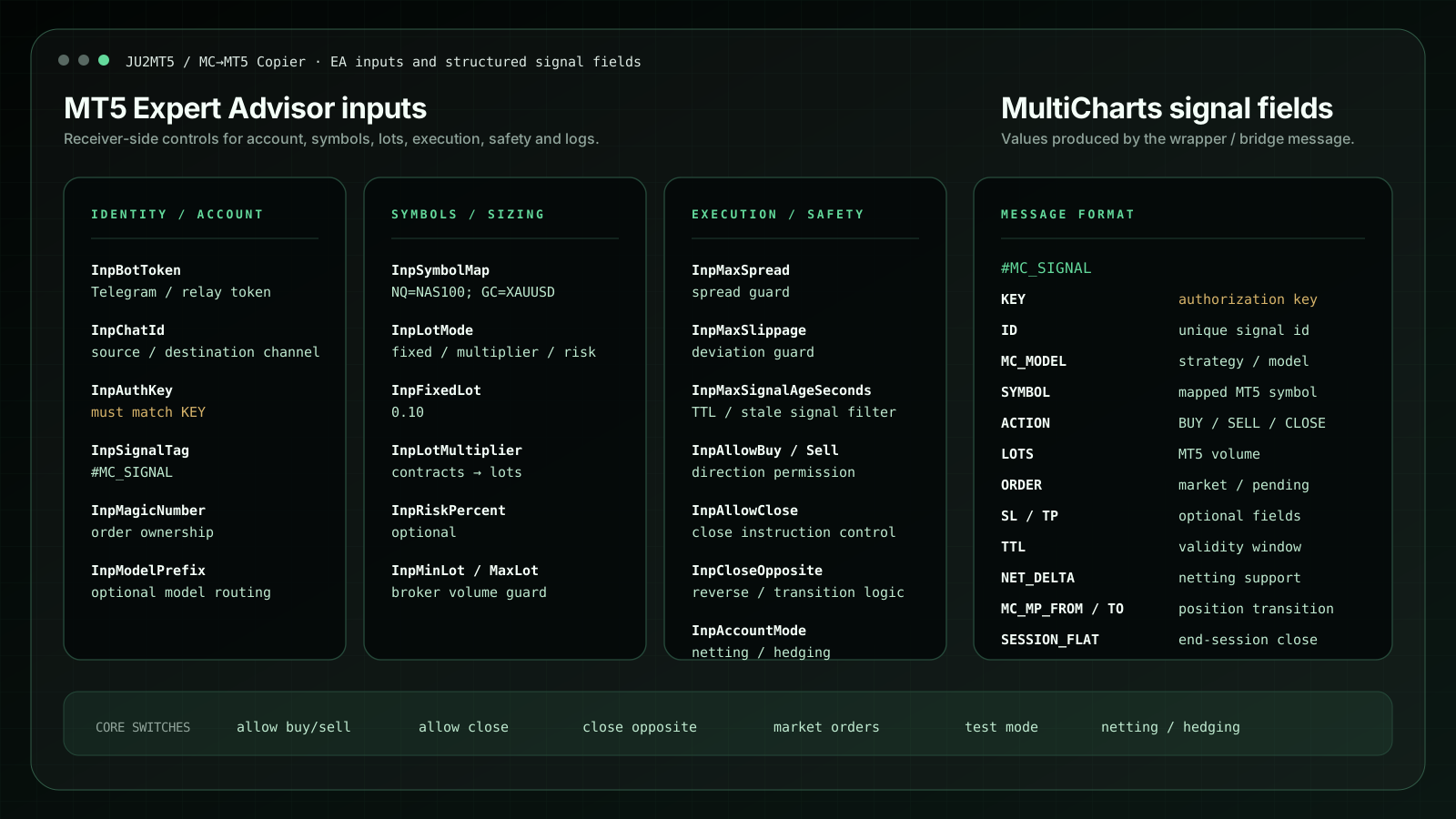
The configuration exposes the controls that matter in real execution: account key, broker symbol, Magic Number, lot conversion, spread/slippage guard, allowed actions, MT5 netting/hedging mode, close/reverse behaviour and logs.
Built for
Professional users who already have a strategy engine and need an MT5 execution route.
Professional traders
Signal providers
Trading desks
Family offices
Technical partners
Core features
When the strategy is in MultiCharts but the destination is on MT5.
Each block answers a practical problem: synchronization, identity, sizing, account mode, reverse behaviour and optional protection levels.
01SYNC
Real-time / low-latency routing
Signals move as structured instructions, not vague text alerts.
- Signal produced in MultiCharts and routed toward MT5
- Heartbeat-style workflow for monitoring
- Designed for stable VPS-based execution
02ID
Model separation
Each strategy needs a clean technical identity.
- Model ID for MultiCharts traceability
- Magic Number for MT5-side order ownership
- Several models can share one terminal
03LOTS
Contracts to lots
A futures-style signal often needs MT5-specific sizing.
- Fixed lot multiplier workflow
- Symbol-specific conversion logic
- Designed for CFDs and smaller account sizes
04REVERSE
Stop & reverse functionality
For models that flip exposure instead of only opening entries.
- Close current exposure when direction changes
- Open the opposite side in the same workflow
- Configurable behaviour by setup
05NET/HEDGE
Netting / hedging support
The workflow can be configured for both MT5 accounting modes.
- Netting-style handling for one symbol position
- Hedging-style handling for multiple tickets
- Account mode checked during validation
06SL/TP
Optional SL / TP fields
Protection levels can be sent only when the workflow requires them.
- Optional stop-loss and take-profit fields
- Can stay empty for strategy-managed exits
- Useful for broker-specific requirements
Signals real-timeExecution low-latency-readyMode netting / hedgingSizing contracts → lots
Self-service documentation
A complete setup path, before support is needed.
The public guide covers prerequisites, installation, strategy identity, broker-symbol mapping, contracts-to-lots configuration, account mode, demo validation and live monitoring.
01Check the environment
02Install the MT5 component
03Configure the source signal
04Map symbols and sizing
05Validate on demo
06Move to monitored live use
Software subscription
7 days free · payment method required
€10per month after trial · one MT5 account
Self-service access to the MC → MT5 copier.
The trial includes the software, setup guide and video library. After seven days, Stripe starts the €10 monthly subscription automatically unless it is cancelled before the trial ends.
No assistance includedThe trial and subscription do not include installation, configuration, custom development, strategy, signals, broker approval or performance guarantees. General contact remains available through the official social profiles.
Stripe checkoutStart the 7-day free trialPayment link will be activated before subscriptions open.
Public proof layer
Open Track Records · Links · Contact →